
The way you pay your tuition depends on whether you are a Canadian or an International student. This page contains instructions for Canadian students.
Tuition and fees include:
- Tuition
- Compulsory fees
- Incidental fees
- Health insurance
When Do Courses Appear on Tuition Statements?
Students are only billed for courses that are officially registered on their file. Courses that are waitlisted or pending will not appear on statements.
Full-year courses are billed entirely in the first semester they are offered. There is no tuition charge for these courses in the second semester.
Courses taken at other Quebec universities will only appear on your Bishop’s statement if they were formally requested and approved.
Courses taken at universities outside Quebec will not appear on your Bishop’s statement, as students pay those fees directly to the host institution.
Residence Charges and Payments
Students living in on-campus housing have a separate billing account and payment process managed by the Residence team. Your residence account is not connected to your student tuition account. For details about residence-related charges and how to make payments, please visit the Living on Campus web page.
How to Check Your Tuition Balance
To view your tuition and compulsory fees balance:
- Log in to Self-Service
- Click on the Finances tab
- Select Balance
- Set the Period dop-down to “All” to view total owing balance
- Keep the View selected as Balance Summary
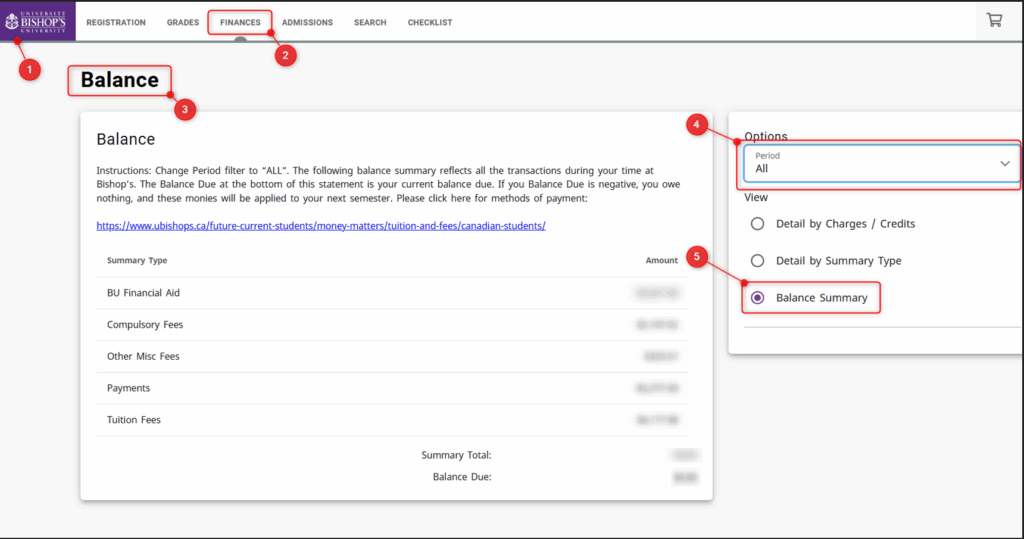
New students will only be able to view this once registered into courses.
For the schedule of when tuition statements are published each semester, visit the Tuition Payment Deadlines page.
Payment Methods
Online Banking (preferred method)
Pay through online banking with most major Canadian banks, including:
- BMO
- CIBC
- Desjardins
- National Bank
- RBC
- Scotiabank
- TD
Add Bishop’s University as a payee and use your student ID number as the account number. Verify that your ID is correct so that your payment can be applied to your account. If you cannot locate “Bishop’s University” in your bank’s payee list, try searching “Bishop” without the apostrophe or “s”.
Other Payment Options:
Payments That Are Not Accepted
- Credit cards
- Credit card cheques
- E-Transfers. Payments via E-Transfer are not accepted and may freeze those funds for up to 30 days.
Quebec tuition rates
Reminder: If you are a Canadian citizen or permanent resident and believe you qualify for Quebec tuition rates, you must submit the required documents during the semester you become eligible. Your tuition category is based on the information available at the time of registration, and it is your responsibility to confirm and provide the relevant documentation. Residency status cannot be updated retroactively for previous semesters. Visit the Quebec Residency page for more information.
Payment Deadlines
Visit the Tuition Payment Deadlines page for current semester deadlines.
Need Help?
Contact Us with any questions.